Hello Welcome In All Information Site. In This Site You Have Read Daily Tech News And Tech Videos. This Is A Technical Info Site Of TRTR You Can Find Here Daily Letest Tech News.

Pop It

Showing posts with label Audacity. Show all posts

Saturday, 27 October 2018

Mono Repeater


Mono Repeater is a classic digital delay simulation of an analog tape delay. The application was designed and written by Tilt Audio, a moniker of Akash Murthy, an audiophile and enthusiast. The sleek interface helps the user dial in the perfect delay, ranging from a subtle ambient reverb effect, to full blown in-your-face echo box. It is mainly intended to be used as a plugin within a host, and boasts a wide range of tempo selection option to dial in the perfect delay time setting when recording or playing to a click track.
Download For Windows - Click Here
Download For Mac - Click Here
Parameters and functions:
  1. Delay Time: is measured in milliseconds and ranges from 30 to 4000ms. Delay time can also be measured in beats (quarter, triplet, half, full, etc) when the selection switch is toggled to Sync. This syncs to an internal clock which can be determined by a manual BPM selection, tap tempo selection or host BPM selection.
  2. Feedback: determines the time taken for the delayed signal to fade out. At 0% the signal is only repeated once, while at 100%, the signal is repeated infinitely with no attenuation. Care should be taken when using this setting close to 100%, since it can cause feedback loops easily while playing out loud and can potentially overload the output device.
  3. High Pass: or Low Cut, determines the low cut off frequency of the high pass filter. It uses a classic 2nd order Butterworth IIR design. Use this to reduce the bass or low end of the delayed signal. Range: 20 - 2kHz.
  4. Low Pass: or High Cut, determines the high cut off frequency of the low pass filter. It uses a classic 2nd order Butterworth IIR design. Use this to reduce the shrillness or high end of the delayed signal. This setting is especially useful when used with string or percussive instruments to drown out the ring or attack sound. Range: 2k - 20k Hz.
  5. Mix: determines the amount of input signal vs delayed signal that is routed to the output.
  6. Type: currently supports two delay modes. Digital is the classic delay mode in which the mono signal is split into two stereo channels. Ping Pong delay offers a wider stereo spread where the signal bounces from one channel to the other.
  7. Host Selection Switch: Toggle this on to receive BPM information from the host application. If used as a standalone application, this is hardcoded to 120 BPM.
  8. Tap: lets you tap in the time by clicking on the tap button several times trying to hold a steady quarter note beat. The BPM can be finely adjusted by clicking and dragging on the BPM box or by entering a specific value.
  9. Performance Switch: is the unnamed switch on the top left which turns of metering and decreases the overhead required to run the plugin. If the plugin experiences sluggish use due to many plugins running simultaneously, use this in the Off setting.
The application allows the user to build a preset library that can can save and recall at anytime. It is supported as a VST and VST3 64-bit plugin and a standalone application in Windows and has added support for AU in OS X.


Share:

Sunday, 14 October 2018

Download Free Stereo Enhancer Vst Plugin


zStereo Enhancer is a simple VST effect plug-in for converting mono to stereo signals as well as for stereo widening. 

This is possible due to the several techniques such as multi-band frequency splitting and panning, phasing one of the channel etc.

  • 4 built-in frequency splitter modes.
  • Easy control with pop-up menus.
  • 16 factory presets.
  • Built-in preset manager with ability to patch name editing.
  • VST automation and full MIDI Learning are supported.


This is a fantastic free plugin that can make any mono sample into stereo


Share:

AutoPan Panner Pluging For Stereo Sound

AutoPan is an LFO controlled panner plug-in
  • Pan mono or stereo signals automatically using a 6 waveform LFO
  • Volume, LFO frequency and pulse-width can be adjusted, as well as pan-width
  • Signals can be panned in two modes: Normal mode: both input channels are panned simultaneously from L to R. o Rotate mode: one input channel is panned from L to R while the other channel is panned from R to L and vice versa


(Server Link)

(Drive Link)
Share:

Tal Dub III Vst Plugin For Echo

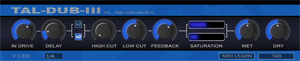
TAL-DUB-III is an easy to use delay device with some special features. Its no tape delay emulation and has its own sound. It has an alias free saturation stage, a non-linear 6dB low pass and a 3dB high pass filter that are included in the feedback path of the device. An input drive knob allows to adjust the saturation level. Pop-up menues show the current values of volume, delay-time and feedback knobs. A tab button allowing to adjust the delay time for live sessions.
  • Delay time up to 4 seconds.
  • Non linear 6dB Low-Pass filter.
  • 3dB High Pass filter.
  • Alias free stauration, adjustable with the input drive knob.
  • Delay x2 for each channel.
  • Synced delay times (1/16, 1/8, 1/4, 1/2, 1/1, 2/1 and trippled and dotted notes).
  • Pop-ups show the actual values dB (input drive, dry, wet), ms(delay), 0..2 (feedback)
  • Led-meter shows the sturation level.
  • Tab button for delay time.
  • Midi Learn for all knobs.
  • The feedback knob is especially optimized for doing infinite delays


image not found
Share:

Saturday, 7 October 2017

Download Kerovee VST Plugin


KeroVee is a Pitch Correction plugin that works as a VST effect.

KeroVee is focused to so-called 'Autotune effect', that is robotic but different from the vocoder.
KeroVee can mix two independent transposed outputs of pitch-corrector and bypassed output.
Watch This Video And Learn How To Use Kerovee Plugin For Making BIG Chorus


Share:

Tuesday, 11 July 2017

Which Plugins Audacity Supporting - Audacity में कौन से PLUGIN Support करते है ?

Plugin Ki Jaroorat Kyo Hoti H :-

Dosto Audacity ek free digital Song Recording aur aur audio work station software hai.
Isme hme kuch basic tools aur Plugin milte hai Jo ki audio ko edit krne m use hote h lekin ye Plugin professional audio editing
Ke liye use nhi ho skte.
Inn abhi Plugin m default crate krna pdta h or pdta lekin inse hm jyada achi audio editing nhi kr skte.
Ek achi quality ki professional audio k liye hme kuch extra Plugin ki help leni pdti h jinme se kuch Plugin Free hote h aur kuch Paid v hote h lekin audacity software m aap free Plugin Hi use kre quki bhot se Plugin audacity m work ni krte to aaj hm aapko btayenge ki kon se Plugin audacity me support krte h


Kon Se Plugin Krte H Support :-

Dosto agr app digit audio work station k koi v software use krte h jese ki Audacity, Fl studio, Cubase, Mixcarft, Logix Pro Etc.
To ye sbhi software m kuch cheeje common hoti h jese ye abhi software VST - Plugin ko easily Support krte hai.
Dosto VST Plugin Audacity me support krte h lekin kuch vst Plugin jese ki instrumental vst Plugin ye sbhi audacity me support ni krte iska reason hai ki audacity sirf ek recording software hai isme aap music production nhi kr skte hai.

Audacity vst ke alawa me kuch or Plugin v support krte hai
Jese ki
1. LADSPA Plugin
2. LV2 Plugin
3. Nyquist
4. VAMP
5.G-VST

Dosto ye abhi Plugin internet pr available hai aap inko download kr skte hai
Agr aapko ye article acha lga to ishe share zaroor kre or audacity ya music production shikhne ke liye hmare youtube Channel pr  visit kre.
Thanks
Share:

Friday, 14 April 2017

Pop It

Copyright © ALL INFORMATION | Powered by Blogger Design by ronangelo | Blogger Theme by NewBloggerThemes.com